Customize the WordPress Admin Without Code
A polished website should not stop at the frontend.
Clients often spend more time inside WordPress after launch than they do looking at the finished homepage. If the backend feels cluttered, generic, or risky to use, the whole project can feel less refined.
That is where a WordPress admin customizer makes a real difference. With UiCore PRO Admin Customizer, agencies can turn the default WordPress backend into a branded, focused, and client-friendly workspace.
Instead of treating the dashboard as an afterthought, Admin Customizer helps make it part of the final product.
Why the WordPress Admin Experience Matters
Most client websites are built for more than visitors.
They also need to work for the people managing content, updating pages, publishing posts, or checking leads after launch.
A default WordPress backend can quickly become overwhelming because it often includes:
- Generic WordPress branding
- Plugin notices and dashboard clutter
- Advanced theme settings
- Demo import tools
- Reset options
- Developer-focused panels
- Widgets clients rarely use
For agencies, this creates friction after handoff.
Clients may ask more basic questions, avoid making updates, or accidentally access settings they should not touch. A cleaner admin experience helps prevent that.
What Is UiCore PRO Admin Customizer?
UiCore PRO Admin Customizer is a white-label feature that lets agencies refine the WordPress backend experience for client projects.
It helps you customize key admin-facing areas, including:
- Theme Options branding
- Admin panel colors
- Theme name and icon
- Login screen design
- Custom dashboard content
- Visible theme features
- Client-facing backend controls
The goal is not just to make WordPress look different. The goal is to make the backend feel intentional, safer, and easier to use.
You can explore it as part of the broader UiCore Pro theme.
A WordPress Admin Customizer Built for Agencies
Agencies often deliver websites that look highly custom on the frontend, but the backend still feels like a standard WordPress install.
Admin Customizer closes that gap.
It helps turn WordPress into a more complete client experience by aligning the backend with the quality of the finished website.
Brand the Backend Experience
With Admin Customizer, agencies can replace generic theme branding with a more polished setup.
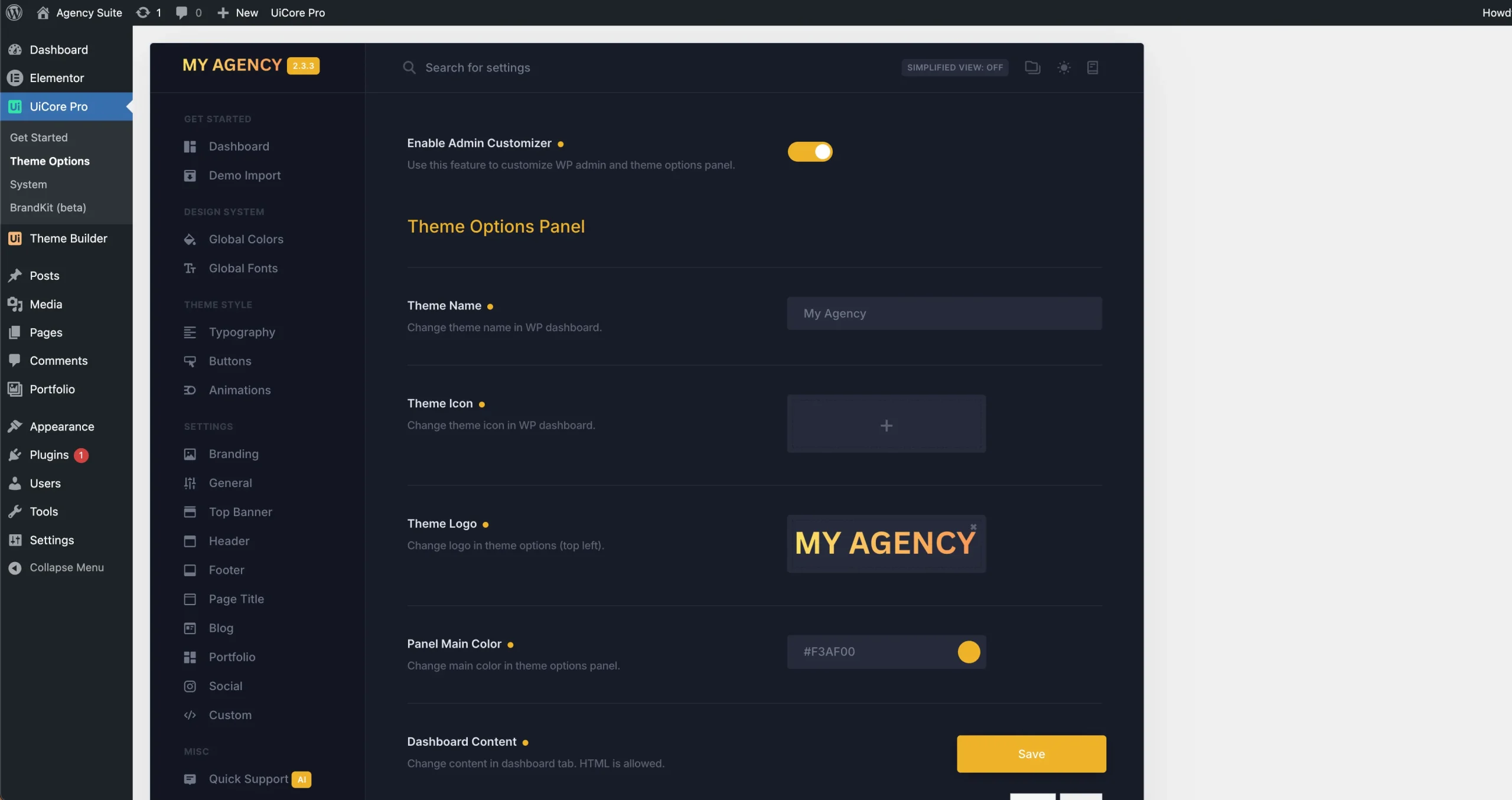
You can customize:
- Theme name
- Theme icon
- Panel logo
- Main admin color
- Theme Options appearance
This is especially useful for white-label projects, retainers, and recurring client work.
For some agencies, the backend can reflect their own brand. For others, it can match the client’s brand and feel like an internal business tool.
Both approaches make the experience feel more deliberate.
Create a More Useful Dashboard
The default WordPress dashboard is rarely designed for clients.
It often shows general WordPress news, site health messages, quick draft widgets, and plugin notices. Some of these are useful for developers, but they are not always useful for the client.
Admin Customizer lets you turn that space into something more helpful.
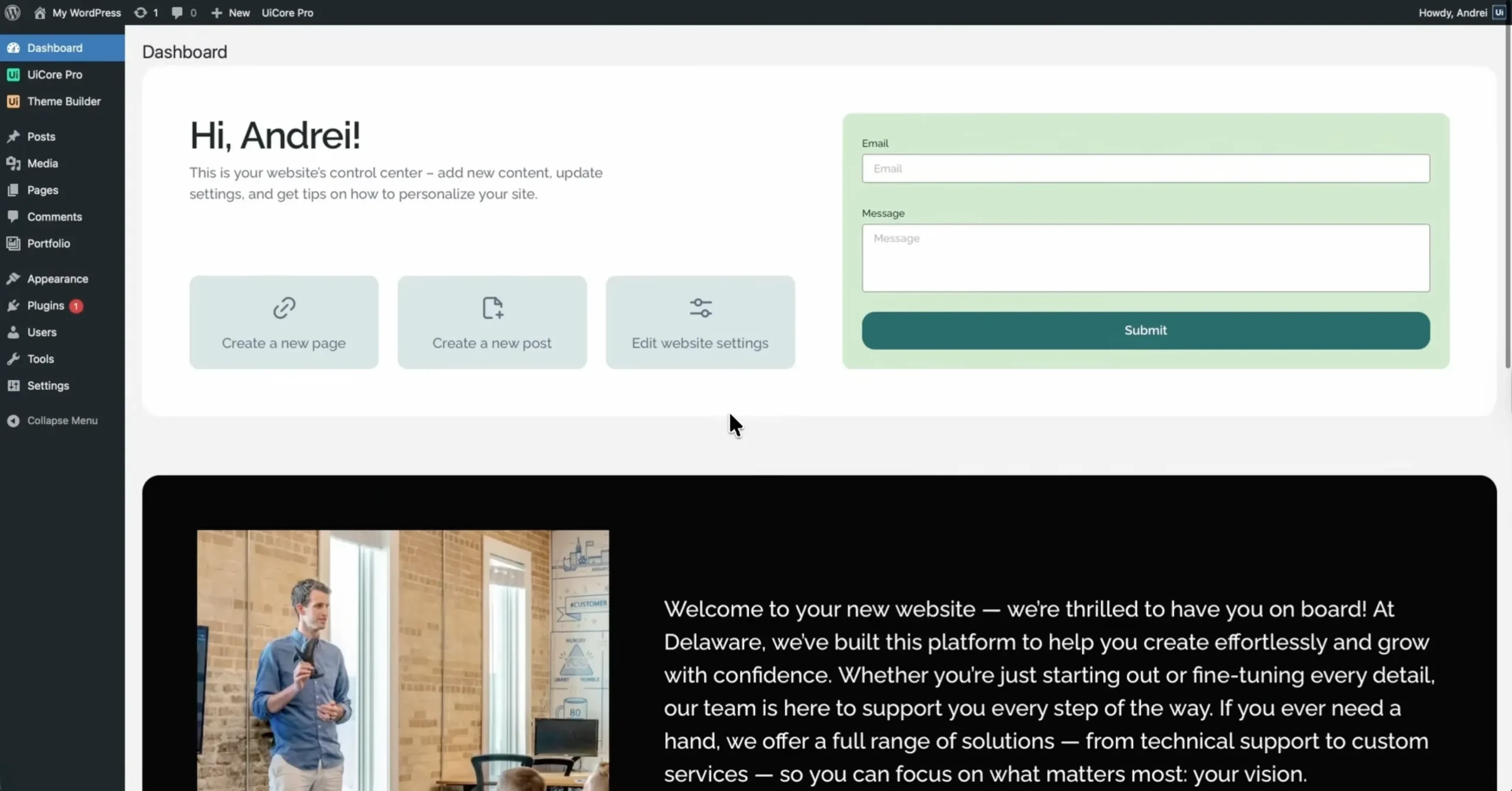
A custom dashboard can include:
- A welcome message
- Quick links to important admin areas
- Editing instructions
- Training videos
- Support details
- Documentation links
- Maintenance plan information
- Common next steps
Instead of asking, “Where do I go now?”, clients can immediately see what matters.
For agencies using reusable headers, footers, and sections, this pairs naturally with the UiCore PRO Layout Builder.
Improve the Login Experience
The login screen is the first backend touchpoint clients see.
A default WordPress login page can feel unfinished, especially after a carefully designed website launch. A branded login screen makes the experience feel more complete from the first click.
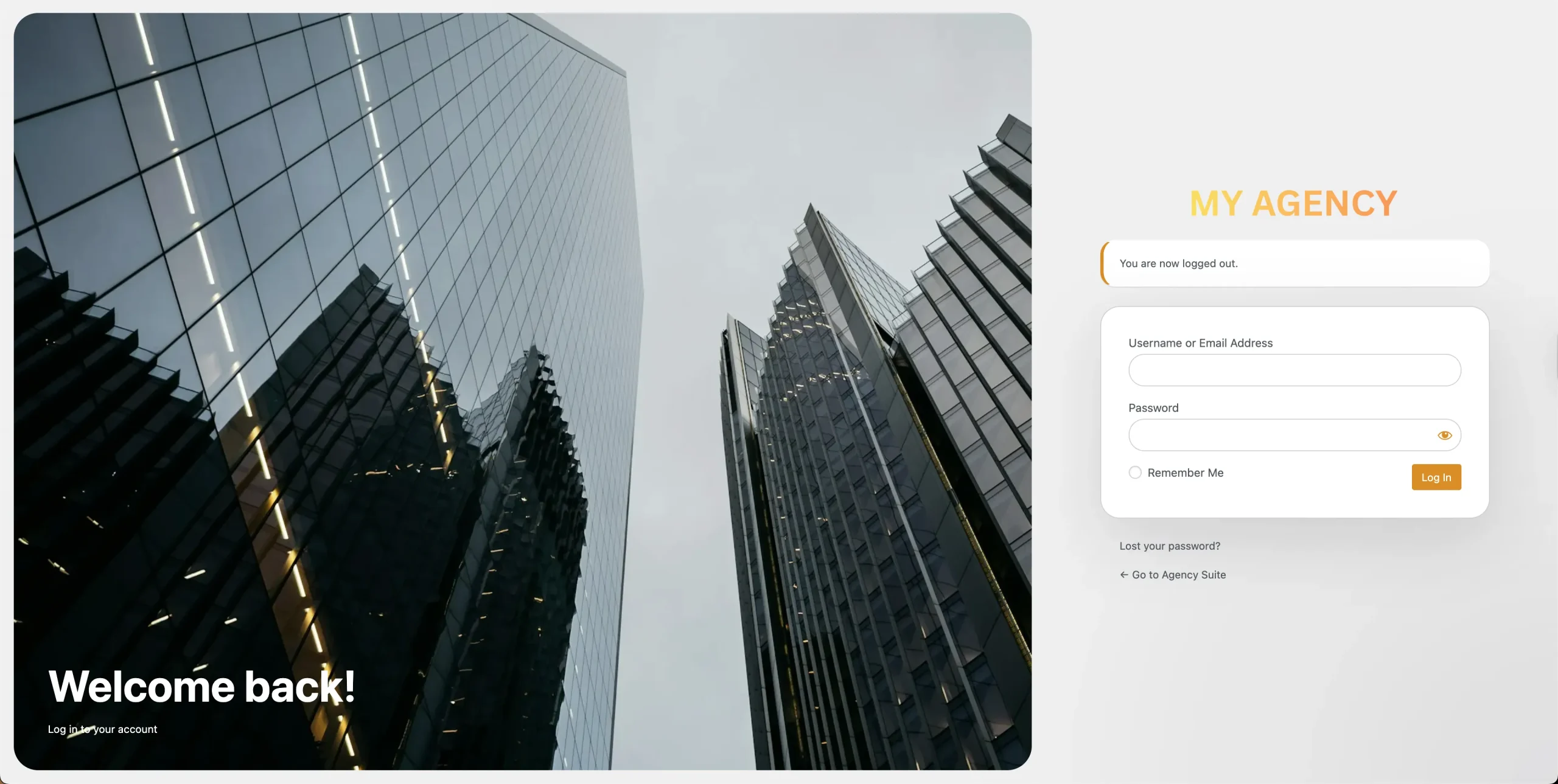
With Admin Customizer, you can adjust:
- Login logo
- Background styling
- Form appearance
- Accent colors
- Button design
This is a small detail, but it improves perceived quality.
It also helps clients recognize that they are entering the correct workspace, especially when managing multiple tools or websites.
Hide Features Clients Do Not Need
A better admin experience is not only about branding.
It is also about reducing risk.
Clients usually do not need access to every setting used during development. Demo import tools, reset options, system information, and advanced theme controls can create confusion or accidental changes.
Admin Customizer helps agencies keep the backend focused by hiding unnecessary theme features from the client view.
This makes WordPress easier to understand and safer to manage after launch.
What a Better Client Handoff Looks Like
A strong handoff should feel calm, clear, and professional.
With UiCore PRO Admin Customizer, the client logs into a backend that feels prepared for them, not just handed over.
A polished setup might include:
- A branded login screen
- A clean Theme Options panel
- A custom welcome dashboard
- Shortcuts to key editing areas
- Support links and training resources
- Hidden developer-only controls
- A visual experience that matches the project
The result is a backend that supports the client instead of overwhelming them.
Where Admin Customizer Fits in UiCore PRO
Admin Customizer works best as part of a complete agency workflow.
A typical UiCore PRO project might look like this:
- Start with professional templates or demos from the UiCore PRO templates
- Build custom layouts using the UiCore PRO Layout Builder
- Refine interactions, design systems, and global styling
- Brand the WordPress backend with Admin Customizer
- Complete the handoff with a cleaner, safer dashboard
This makes the backend part of the service, not a forgotten technical layer.
For agencies creating multiple client websites, that consistency can save time and improve every handoff.
Why This Matters for Client Relationships
Clients do not always notice the technical decisions behind a website.
They do notice how easy it feels to manage.
A clean admin experience can help agencies:
- Reduce avoidable support questions
- Build more confidence after launch
- Make WordPress feel less intimidating
- Protect advanced settings from accidental changes
- Deliver a more premium project experience
- Strengthen long-term client trust
The backend becomes part of the perceived value of the website.
It shows that the agency thought beyond the launch date.
Common Use Cases for Admin Customizer
Admin Customizer is especially useful for:
Agency Client Websites
Give clients a cleaner WordPress experience while keeping advanced tools out of sight.
White-Label Website Projects
Replace default theme branding with your agency identity or client branding.
Maintenance and Retainer Clients
Add support links, documentation, and update guidance directly inside the dashboard.
Multi-Site Client Workflows
Create a consistent backend structure across multiple client projects.
Premium Website Packages
Make the handoff feel more polished and complete with branded admin details.
A Small Feature That Changes the Handoff
Admin Customizer may seem like a small backend feature, but it can change how clients experience the entire project.
It helps agencies move from “here is your WordPress login” to “here is a workspace built for managing your website.”
That difference matters.
A thoughtful backend can reduce confusion, improve confidence, and make your work feel more complete after launch.
Final Thoughts
A website handoff should not end at the frontend.
With UiCore PRO Admin Customizer, agencies can create a branded WordPress admin experience that feels cleaner, safer, and easier for clients to use.
It is a practical way to improve the post-launch experience without adding complexity to the build process.
To build a better handoff process, try UiCore PRO and also explore our ready-made templates for your next client project.

Mihai Iosif
Marketing manager at UiCore. Helps shape how UiCore is shared with the world, from product launches to community and content.